Built for Indian teams

HR reports built around your connected workforce data

Review people and payroll information from a single reporting workspace. EmplifyAI brings operational reports together while respecting the signed-in user’s role and permitted scope.

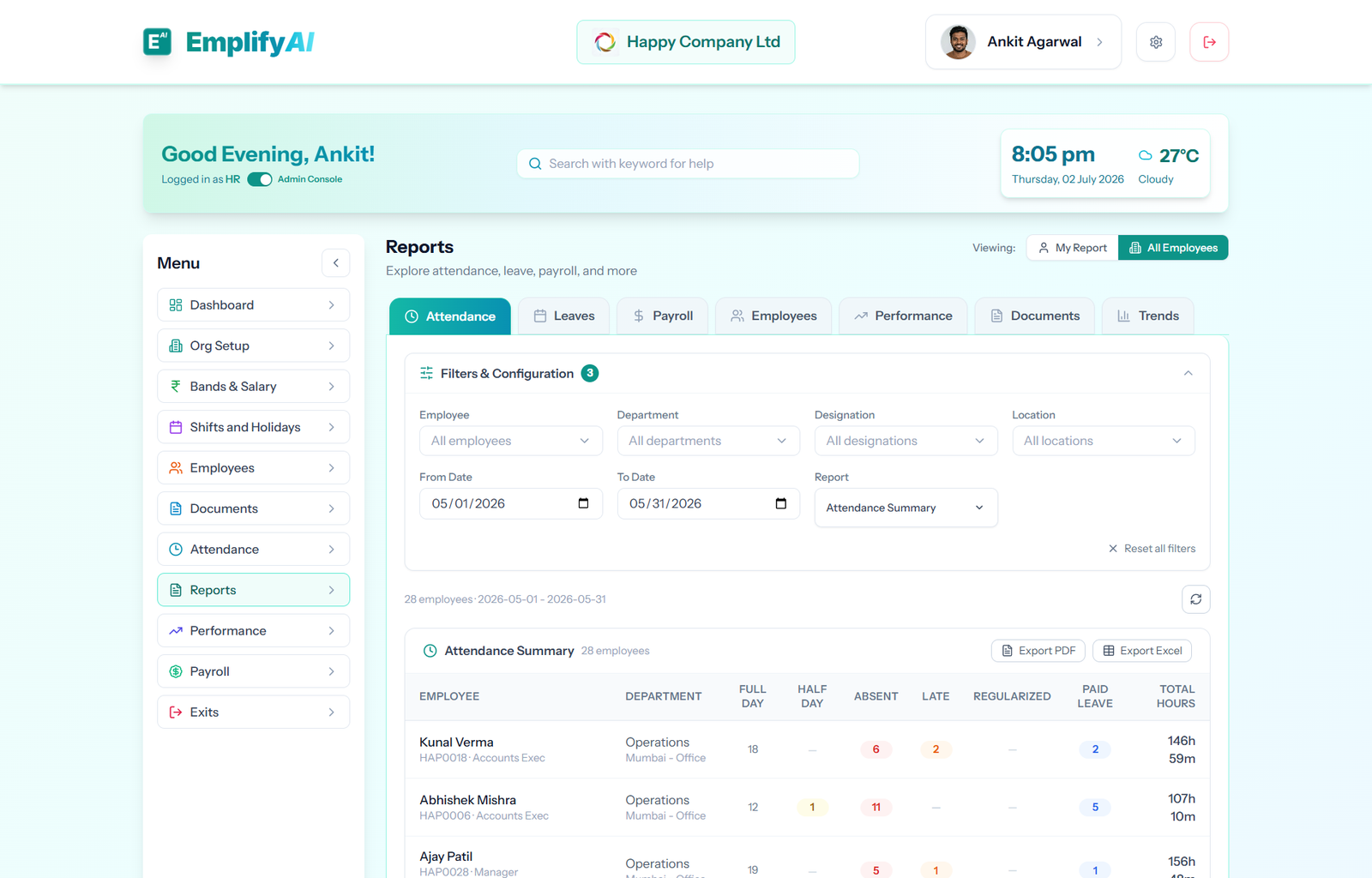
EmplifyAI reports and analytics workspace for workforce data

See the reports relevant to your role

The reporting hub includes attendance, leave, payroll, employee, performance, document and trend sections. Available sections depend on role, permissions and plan, so employees and managers do not receive unrestricted organisation-wide access.

Investigate attendance and leave

Review attendance records, exceptions and leave information with the filters and scope available to your role. Bring the supporting data into view when preparing workforce decisions.

Review payroll and statutory records

Authorised payroll teams can use payroll reports and statutory registers, including PF, ESI, Professional Tax and TDS views. Use these records to review outcomes and prepare the next compliance steps.

Follow workforce and performance trends

Explore employee, document and performance information and, on eligible plans, trend views. Report exports are available in supported sections for sharing with authorised stakeholders.

How the workflow fits together

  1. Open the reporting hub with your assigned role.
  2. Choose an available report section and scope.
  3. Apply relevant filters to inspect the data.
  4. Export a supported report when you need a copy.

Frequently asked questions

What HR reports are available?

The hub covers attendance, leave, payroll, employees, performance, documents and trends. Visibility varies by role, permissions and plan.

Can employees see company-wide payroll reports?

No. Report access and scope follow the signed-in user’s permissions. Employee access does not imply access to company-wide payroll data.

Can reports be exported?

Supported report sections offer exports. The available format depends on the report and the user’s access.

See how it fits your organisation

Share your requirements with the team. We review early-access requests and send a secure sign-up link; you do not need to enter payment-card details to request access.

Request early access